
PlantSnap: Plant Identifier
PlantSnap, Inc.Education
3.88.66K Reviews
- Version
- 8.0.2
- Installs
- 10.00M
- Age Rating
- Everyone
Screenshots
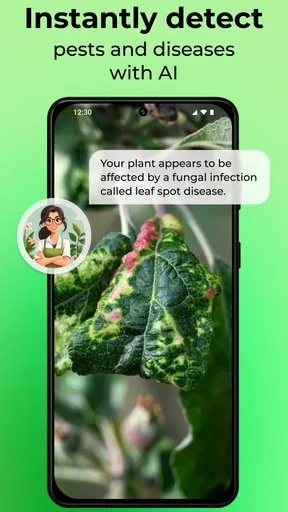
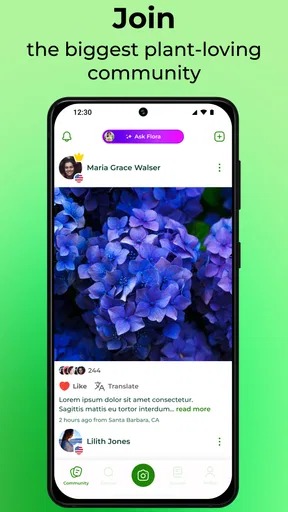
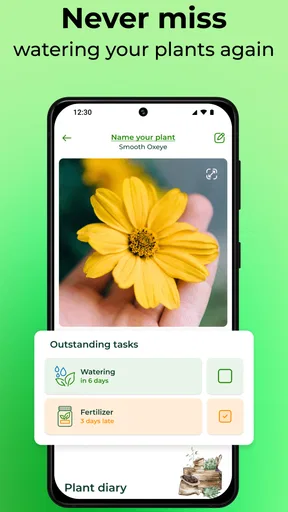
Our Review of PlantSnap: Plant Identifier
 Analysis by Appyee
I use plant-identification apps when I am walking through a park, visiting a garden center, or trying to understand a plant that has appeared in a neglected corner of the house. PlantSnap: Plant Identifier is built around that single, useful moment: point your phone at a plant and get help recognizing it. That sounds simple, but the quality of the result depends heavily on the photograph, the plant itself, and how carefully I treat the answer.
Created by PlantSnap, Inc., this free Education app is aimed at curious beginners, gardeners, students, hikers, and anyone who regularly asks, “What is that?” It supports identification of plants, leaves, trees, and flowers, then extends that basic discovery into plant-care guidance. The app is available for Everyone, runs on Android from version 8.0 onward, and its current version is 8.0.2. It has attracted more than ten million installs, although its average rating of 3.8 from roughly ninety-five thousand ratings suggests that the experience is useful but not equally smooth for every user.
Plant recognition is the feature that decides whether the app earns a place on your phone
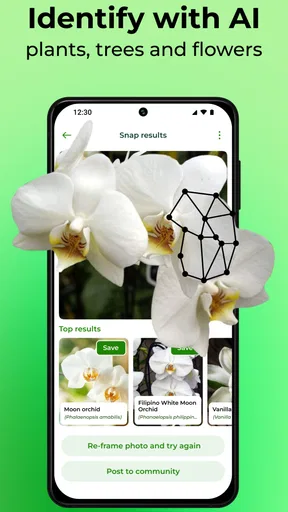
The central capability is visual plant identification. Instead of searching through long lists of botanical names or comparing a photograph with dozens of web images, I can begin with the object in front of me. That makes the app especially approachable when I know almost nothing about a specimen. I do not need to understand botanical terminology before starting; I can simply frame a leaf, flower, or whole plant and see what the app suggests.
The real value is not just receiving a name. A name gives me a starting point for better research, safer care, and more useful conversations with other gardeners. Once I know a likely species or group, I can investigate light, watering, soil, seasonal behavior, and toxicity from more specialized sources when those details matter. In that sense, the app works best as a fast first layer of knowledge rather than as a replacement for a botanist or horticultural reference book.
I also like the educational effect. After using it repeatedly, I pay more attention to leaf arrangement, flower shape, bark, and overall growth habit. The camera becomes a prompt to observe rather than merely a shortcut to a label. For children and students, that makes the app more engaging than a static encyclopedia, because the learning begins with something they have actually found outdoors.
There is an important distinction between identifying a plant and diagnosing its condition. A visual identifier may recognize the species while missing the reason its leaves are yellow, curled, spotted, or drooping. I would not use a suggested name alone to decide whether a plant is edible, medicinal, poisonous, or safe around pets. Those decisions need confirmation from a dependable local or specialist source.
What I do before taking the identifying photo
My results improve when I slow down for a few seconds instead of photographing the plant from across a room. I try to capture a clear leaf and, when available, a flower or fruit. A full-plant image provides context, while a close view shows the features that separate similar species. If the plant is small, I move closer and keep the subject centered rather than including a busy background.
Lighting matters more than many first-time users expect. Strong glare can erase the texture of a leaf, while deep shade can hide color and shape. I get better practical results in soft daylight, with the camera held steadily and the plant filling much of the frame. If the first suggestion seems surprising, I take another image from a different angle instead of immediately trusting or rejecting it.
This is one of the app's less obvious trade-offs: convenience encourages quick snapshots, but accuracy rewards deliberate photography. A blurry image can make an intelligent system look unreliable when the real problem is that it had too little visual information. I treat the first result as a hypothesis, then compare it with visible features and, if necessary, submit a better image.
How the identification fits into a normal day
Imagine finding an unfamiliar plant at a weekend market. I could search “plant with round leaves and purple flowers,” but that description is vague and may lead me toward unrelated results. With PlantSnap, I can photograph the specimen, note the suggested identity, and ask the seller whether it matches. If the result is close but not convincing, the conversation becomes more precise: I can show the image and compare the leaf shape, flower arrangement, and mature size.
At home, the same workflow helps with an inherited houseplant whose label has disappeared. I photograph the plant in good light, check whether the suggested name matches its structure, and then use that name to look up a care routine suited to the species. This is more efficient than watering by guesswork, especially when I am deciding whether a plant prefers bright light, a humid room, or a period of drying between waterings.
On a walk, the app is useful in a different way. I can identify a tree by combining a wider image of its form with closer images of its leaves or bark. The result may not settle every case, particularly when related species look alike, but it gives me a sensible route for further learning. I find that more rewarding than simply photographing scenery, because each walk can turn into a small field lesson.
The strongest scenario is building confidence around unfamiliar plants
The best use case is not professional fieldwork. It is the ordinary person who has encountered a plant and wants a quick, understandable starting point without carrying a heavy reference guide. New gardeners gain the most immediate benefit because the app reduces the intimidation of unfamiliar names. A beginner can identify a plant first and then learn the vocabulary needed to care for it.
I can also see value for someone creating a personal record of plants in a garden. After identifying a specimen, I would save the name in my own notes alongside the location, the date I noticed it, and observations about sunlight or growth. The app supplies the initial recognition, while my notes preserve the local context that an automated result cannot know. This combination is more useful than relying on memory after identifying several plants in one afternoon.
For educators, the camera-based approach can support an outdoor activity: students photograph different plant parts, compare suggested identities, and discuss why two results may differ. The important lesson is not that the machine is always right. It is that identification involves evidence, comparison, and sometimes expert confirmation. That makes the app more valuable when it encourages questions instead of ending the investigation too quickly.
It is less suitable when the cost of a mistake is high. If I needed a legally dependable species determination, advice about consuming a wild plant, or a precise diagnosis of disease, I would choose a qualified expert or a specialized reference in addition to any app. A general visual tool is excellent for orientation, but orientation is not the same as certification.
Where the care angle helps, and where I remain cautious
The care side makes identification more practical. A name by itself can feel like a novelty; connecting that name with everyday maintenance gives it a purpose. When I am trying to rescue a plant, the ability to move from recognition toward care information can save time and prevent random changes to watering or placement.
Still, care advice should be interpreted through the plant's actual conditions. Two plants of the same species may behave differently because of pot size, soil drainage, indoor heating, seasonal light, or previous stress. I would use the app to guide my questions, then observe the plant over time rather than applying every recommendation mechanically. If a plant is declining, I check roots, moisture, light, pests, and recent changes instead of assuming the identification screen explains everything.
Another practical tip is to photograph the plant before making major changes. That gives me a visual record of its original condition and helps me compare progress later. If I take another image after improving light or adjusting watering, I can judge whether the plant is responding. This turns a one-time identification into a small care experiment, even though the app itself does not replace my own observation.
Free access is appealing, but the purchase model deserves attention
The app is free to install, which makes experimenting easy. I can try it during a walk or use it for a single houseplant without committing money upfront. In-app purchases range from ninety-nine cents to forty-nine dollars and ninety-nine cents per item, so I would read the purchase screen carefully before confirming anything. The broad range means the free starting point and the optional paid content should not be treated as the same experience.
This matters most for casual users. If I only identify a few plants each season, the free experience may be enough for my needs, depending on what I want to access. A serious hobbyist may find additional value in deeper care-oriented use, but should decide based on repeated personal use rather than assuming that every paid option is necessary. I prefer testing the basic workflow first: photograph a few easy subjects, inspect the results, and decide whether the app genuinely improves my routine.
The rating of 3.8 is a useful signal to keep expectations balanced. The app has clearly reached a large audience, yet the score is not so high that I would install it expecting flawless recognition. In my view, that makes the photography habits and verification steps especially important. The tool can be helpful without being perfect, and its usefulness depends on whether I am comfortable checking uncertain results.
How it compares with searching the web or using a specialist guide
Web search is often better when I already know what feature matters. If I can describe the flower color, region, season, and leaf arrangement, a carefully chosen search may lead to authoritative gardening or botanical pages. The disadvantage is that I must supply the right words. PlantSnap is more convenient at the beginning of the process because the image does the initial descriptive work for me.
Printed field guides remain stronger for deliberate identification. They encourage me to compare several characteristics and often provide regional context that a general app may not emphasize. They are also useful when I am outdoors without a dependable connection or when I want a reference I can consult slowly. I would choose a guide for serious study and the app for quick discovery.
Specialized gardening communities can be better when the question involves a difficult cultivar, a pest, or a regional look-alike. Experienced people may notice details that a single photograph misses and can ask follow-up questions about soil, climate, or recent symptoms. PlantSnap is faster and less social, which is exactly why it is convenient, but that convenience comes with less human interpretation.
The most effective approach for me is combining tools rather than forcing one to do everything. I use the app to produce a likely name, visual references to check the match, and specialist sources when safety or expensive plant care is involved. That workflow preserves the speed of visual recognition without giving an uncertain result more authority than it deserves.
Small habits that make the app more useful
- Photograph several plant parts. A whole-plant image shows growth habit, while a close image of a leaf, flower, fruit, or bark can reveal distinguishing details.
- Repeat uncertain identifications. If the suggested plant conflicts with what you see, change the angle and lighting before accepting the result.
- Record the surrounding conditions. Note whether the plant was indoors, in shade, beside water, or in a dry roadside area; that context helps you judge whether the suggestion makes sense.
- Separate recognition from safety decisions. Treat the name as a research lead, not permission to eat, handle, or give the plant to an animal.
- Use your own care log. Pair the identification with dates, watering changes, and photographs so you can learn what works in your particular environment.
These habits address the main weakness of visual identification: a photograph can omit the very detail needed to distinguish similar plants. They also prevent a common beginner mistake, which is changing several care factors at once after receiving a name. A careful, gradual approach produces more useful learning than a quick sequence of guesses.
Who should install it, and who should look elsewhere
I recommend it to beginner gardeners, families, students, hikers, and curious people who want an approachable way to investigate plants around them. It is particularly worthwhile if you often encounter unlabeled houseplants or enjoy turning walks into small identification exercises. The free entry point lowers the barrier, while the care focus gives the results more practical value than a name-only camera tool.
I would be more cautious recommending it to professional botanists, collectors dealing with rare specimens, or anyone making safety-critical decisions. Those users need regional expertise, detailed references, and a verification process that goes beyond a convenient image result. People who dislike reviewing uncertain answers may also become frustrated, because visually similar plants can make any automated identification feel less decisive.
For me, the app succeeds when I use it as a friendly field assistant rather than an unquestionable authority. Its strongest effect is psychological as much as practical: it makes me more willing to stop, look closely, and learn the name of something I would otherwise walk past. That is a meaningful benefit for an Education app, even when the answer needs checking.
My recommendation is to try PlantSnap: Plant Identifier if you want quick visual clues and a gentle path into plant care. Start with clear photographs, test it on familiar plants, and keep a skeptical eye on surprising results. The experience cannot replace expert identification or a specialist guide, but for everyday discovery and beginner-friendly research, it offers a useful bridge between seeing a plant and understanding what to do next.
Verdict
Strengths of PlantSnap: Plant Identifier
- Identifies many common plants from a single photo.
- Includes plant information such as names, traits, and growing details.
- Useful for exploring unfamiliar plants during walks or travel.
- Search tools help browse plants beyond camera-based identification.
- Available on both Android and iOS devices.
Limitations of PlantSnap: Plant Identifier
- Accurate results often require a clear, well-lit photo.
- Rare or visually similar species may be identified incorrectly.
- Many useful features require a paid subscription or purchase.
- Results can take longer when the internet connection is weak.
- The app may request access to your camera and location.
Similar Picks in This Category
View All
Duolingo: Language Lessons
Duolingo4.7

Google Classroom
Google LLC2.8

Unacademy: Learn & Crack Exams
Unacademy3.2

Bible App for Kids
Life.Church4.4

Cake - Learn English & Korean
Cake Corp.4.7

Brainly: AI Homework Helper
Brainly4.5
Frequently Asked Questions
What is PlantSnap: Plant Identifier used for?
PlantSnap is designed to help you identify plants, flowers, trees, fungi, and other botanical specimens using your phone’s camera. After taking or uploading a photo, the app compares the image with its database and suggests a likely match. It can be useful for gardeners, hikers, students, and curious nature lovers, although results should be treated as guidance rather than guaranteed scientific identification.
How accurate is PlantSnap when identifying plants?
PlantSnap can provide helpful results when the photograph is clear, well lit, and shows distinctive parts of the plant, such as leaves, flowers, fruit, or bark. However, accuracy may vary depending on the image quality, plant species, growth stage, and regional availability of similar-looking plants. For potentially poisonous, edible, or medically significant species, always confirm the result with a qualified expert or reliable botanical reference.
Does PlantSnap require an internet connection to work?
PlantSnap generally relies on online image recognition and database services, so an internet connection is usually needed to identify a plant and load detailed information. This may be important when using the app while hiking or traveling in areas with weak reception. You can still take photographs for later review, but some identification features or content may not function fully offline.
Is PlantSnap free to download and use?
PlantSnap may be downloaded for free, but access to all of its identification tools, plant information, saved collections, or additional features can depend on the app’s current subscription or in-app purchase options. Pricing and trial conditions may differ between Android and iOS and can change over time. Before confirming a purchase, check the store listing carefully for renewal terms and cancellation instructions.
What should I do if PlantSnap gives an incorrect identification?
If the result seems wrong, try taking another photograph from a different angle and include several useful details, such as the entire plant, a close-up of the leaf, the flower, and the stem. Avoid blurry images, harsh shadows, and heavily cropped photos. Compare the suggestion with multiple trusted sources, especially before eating a plant, treating an illness, or handling a species that could be toxic or irritating.
